


Ink and Toner - Lowest Prices on Cartridges for all Printers
-
Printer Series
- Printer Series
-
Printer Model
- Printer Model



More About CN Printer Ink & Toner Cartridges
Tips on Using CN Toner Cartridges & Ink Cartridges
- Use Compatible CN Cartridges: Compatible CN cartridges are third-party cartridges that are designed to work with CN printers. They are much cheaper than genuine CN cartridges while provide genuine-like performance.
- Store Cartridges Properly: If you have to store cartridges for an extended period, keep them in a cool and dry place. Avoid exposing them to direct sunlight or extreme temperatures. Also, keep the cartridges in their original packaging until you are ready to use them.
- Install Correctly: Always ensure that you install the cartridges correctly. Follow the instructions in the user manual or on the packaging. Do not force the cartridges into the printer or touch the nozzles as this can damage them.
- Use Printer Regularly: If you do not use your printer regularly, the ink may dry out in the cartridges, causing clogging or other problems. To avoid this, print something once a week or perform a print head cleaning cycle.
- Use Economy Mode: If you want to save ink or toner, use the economy mode feature on your printer. It reduces the amount of ink or toner used for printing, but the quality may be slightly lower.
- Replace Cartridges Promptly: When your printer indicates that a cartridge is low or empty, replace it promptly. Running the printer with empty cartridges can damage the printer and lead to poor quality prints.
What Is Compatible CN Toner Cartridge?
A compatible CN toner cartridge is a third-party toner cartridge designed to work with CN laser printers. These cartridges are made by companies other than CN, but they are designed to be compatible with CN printers and meet the same quality and performance standards as genuine CN cartridges.
Compatible toner cartridges are often less expensive than genuine CN cartridges, which makes them an attractive option for people who want to save money on their printing costs. However, it’s important to buy from a reputable supplier to ensure that the cartridge will work properly with your printer and won’t damage the printer. And when choosing a compatible toner cartridge, make sure to look for one that is designed specifically for your CN printer model.
CN Ink Cartridge vs Toner Cartridge, What Is the Difference?
Ink cartridges and toner cartridges are both used in printers, but they are designed for different types of printers and have different functions. Here are the key differences between the two:
CN Ink Cartridges
CN ink cartridges are used in CN inkjet printers. These printers use liquid ink to create text and images on paper. Ink cartridges contain small chambers filled with liquid ink that is applied to the paper through a series of nozzles. Inkjet printers are generally less expensive than laser printers, but the cost of ink cartridges can add up over time.
CN Toner Cartridges
CN toner cartridges, like CN ImageClass LBP151dw, are used in CN laser printers. These printers use a dry powder called toner to create text and images on paper. Toner cartridges contain toner powder, which is applied to the paper using heat and pressure. Laser printers are generally more expensive than inkjet printers, but they are faster and more efficient for high-volume printing.
In summary, CN ink cartridges are used in inkjet printers and contain liquid ink, while CN toner cartridges are used in laser printers and contain dry toner powder. Inkjet printers are generally less expensive but have higher ink costs, while laser printers are generally more expensive but have lower toner costs.
How Many Pages Does A CN Ink Cartridge Print?
The number of pages a CN ink cartridge can print will depend on the specific cartridge model and the printing conditions such as the type of document being printed, the density of the text or images, and the printer settings used. CN ink cartridges typically have a page yield rating that indicates the estimated number of pages that can be printed with that cartridge under standard printing conditions.
For example, CN PGI-280XXL CLI-281XXL ink cartridges for PIXMA TR7520 and TR8520 printers have a page yield of 600 pages per PGBK cartridge and a page yield of 830 pages per color cartridge, while the CN PGI-270XL CLI-271XL ink cartridges for PIXMA MG5720 and MG7720 printers have a page yield of 500 pages per PGBK cartridge and a page yield of 300 pages per color cartridge.
CN page yield is measured using a standardized test method known as ISO/IEC 24711 or ISO/IEC 19752 for monochrome cartridges and ISO/IEC 19798 for color cartridges. These standards specify a set of test pages that are printed using a specific printer model, under controlled laboratory conditions. The test pages consist of a mix of text and graphics that are representative of typical office or home use. The number of pages that can be printed before the cartridge runs out of ink or toner is then recorded and used to determine the page yield. This yield is usually expressed as a range, which takes into account the fact that some pages may use more ink or toner than others depending on their content.
It’s important to note that the page yield can vary depending on several factors, such as the type of paper used, the printer settings, and the operating environment. Actual yield may vary considerably from the stated range and depends on the content of printed pages, frequency of printing, ink or toner coverage per page, and environmental conditions.
What are remanufactured ink cartridges for CN printers?
Remanufactured ink cartridges for CN printers are original cartridges that have been thoroughly cleaned, refilled with ink or toner, and carefully inspected for quality. These recycled cartridges undergo a meticulous process to ensure they meet or even exceed the standards set by the Original Equipment Manufacturer (OEM). By using remanufactured cartridges, you can trust that you are utilizing high-quality printer ink that has been refurbished to perform like new.
Standard Capacity vs High Capacity, Which CN Cartridge Shall I Buy?
The decision of whether to buy a standard capacity or high capacity CN cartridge will depend on your printing needs and budget.
Standard capacity cartridges generally contain less ink or toner than high capacity cartridges and are designed for low to moderate printing needs. They are typically less expensive than high capacity cartridges, but will need to be replaced more frequently.
High capacity cartridges, on the other hand, are designed for higher volume printing needs and contain more ink or toner than standard capacity cartridges. They can be more expensive than standard capacity cartridges, but can save you money in the long run by reducing the frequency of cartridge replacement.
When deciding which cartridge to buy, consider how often you print, how many pages you typically print, and your budget. If you only print occasionally or in small volumes, a standard capacity cartridge may be sufficient. However, if you print frequently or in large volumes, a high capacity cartridge may be more cost-effective in the long run.
Why Does CN Inkjet Printer Use Two Black Ink Cartridges?
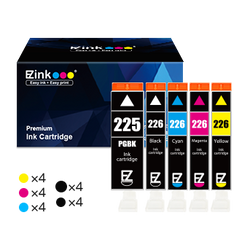
Some CN inkjet printers use two black ink cartridges, typically a standard black ink cartridge (CLI) and a larger, pigment-based black ink cartridge (PGI). PGI refers to pigment ink (PGBK), which is mainly used to print text. CLI refers to ChromaLife ink, which is a labeling term coined by CN. It is actually dye ink (BK), and it is mainly used to print images and graphics. Take CN 280/281 XL ink cartridges for PIXMA printer as an example. The 5-pack printer ink cartridges include CLI-281XL color ink cartridges (black cyan magenta and yellow ink) and a PGI-280XL black ink cartridge.
There are several reasons why CN uses two black ink cartridges in some of their printers:
- Better quality for text documents: The pigment-based black ink cartridge is designed to produce sharper and crisper text documents, making it ideal for printing letters, reports, and other text-heavy documents.
- Improved quality for photos: The dye-based black ink cartridge is better suited for printing photos and graphics, as it produces more vibrant colors and smoother tonal gradations.
- Better ink efficiency: By separating the black ink into two cartridges, CN can optimize the ink usage for each type of printing, helping to reduce waste and improve the overall efficiency of the ink usage.
- More cost-effective: By using a separate cartridge for text and photo printing, users can replace only the ink cartridge that has run out, rather than replacing a combined ink cartridge that may still have plenty of ink left for one type of printing but not the other.
Overall, the use of two black ink cartridges in some CN inkjet printers is aimed at providing better print quality and efficiency for both text and photo printing, while also giving users more control over their ink usage and costs.
How to Refill CN Toner Cartridges?
Refilling your CN toner cartridges can save you money, reduce waste, and extend the life of your printer. Here are the steps to refill your CN toner cartridges:
- Purchase a toner refill kit: You can purchase a toner refill kit for your specific CN cartridge model online or at an office supply store. The kit should include a replacement toner bottle, a funnel cap, and instructions.
- Prepare your work area: Choose a clean, well-lit workspace where you won’t be disturbed. Place a cloth or paper towel under the cartridge to catch any spilled toner.
- Remove the cartridge: Turn off the printer and unplug it from the power source. Open the printer cover and remove the toner cartridge by pulling it straight out of the printer.
- Locate the fill hole: Each CN cartridge model has a small fill hole on the side or top of the cartridge. Locate the fill hole and remove the plastic plug or tape covering it.
- Refill the cartridge: Attach the funnel cap to the bottle of replacement toner and insert it into the fill hole. Slowly pour the toner into the cartridge until it reaches the fill line or the level of the existing toner.
- Seal the hole: Replace the plastic plug or tape to cover the fill hole. Be sure it is securely in place to prevent toner leakage.
- Reinstall the cartridge: Place the refilled cartridge back into the printer, making sure it is securely seated.
- Test the printer: Turn on the printer and run a test print to ensure the toner is evenly distributed and the print quality is acceptable.
Note: It is important to follow the specific instructions that come with your toner refill kit and to use only toner that is designed for your specific CN cartridge model. Improper handling or use of toner can be hazardous to your health and damage your printer.
However, while refilling toner cartridges may seem like a cost-effective option, it can come with several drawbacks that can ultimately end up costing you more in the long run.
- Quality: When you refill a toner cartridge, you are introducing new toner powder into the existing cartridge. This can result in inconsistencies in the quality of the printouts. Refilled toner cartridges may produce streaks, smudges, and other printing defects that can be unsightly and reduce the professional appearance of your documents.
- Compatibility: Nowadays, most CN toner cartridges come with built-in smart chips. Even if you refill the toner, the chip’s toner capacity data cannot be refreshed. So when you install a filled toner cartridge, your CN printer will still think the toner is out, giving a “Low Toner” error message or even rejecting the refilled cartridge.
- Guarantee: There are no guarantees for refilled toner cartridges. If they damage your printer, you will not be entitled to any compensation. Conversely, if you purchase compatible cartridges, your supplier will provide a guarantee on the toner cartridges. For example, we offer a 60-day money-back guarantee and a 2-year product warranty on all products, so you can buy and use our products with confidence
What’s more, compatible CN cartridges are so affordable that there’s no need to spend time and money refilling them yourself. Therefore, it is generally recommended to replace cartridges directly instead of refilling them to ensure quality, compatibility and guarantee.

ENTER YOUR EMAIL
Subscribe to obtain $5 off Coupon!
loading...
WELCOME BACK!
You're already on the list
Take $5
as a thank you for comming
USE CODE: Newez123
